
UMA Agent
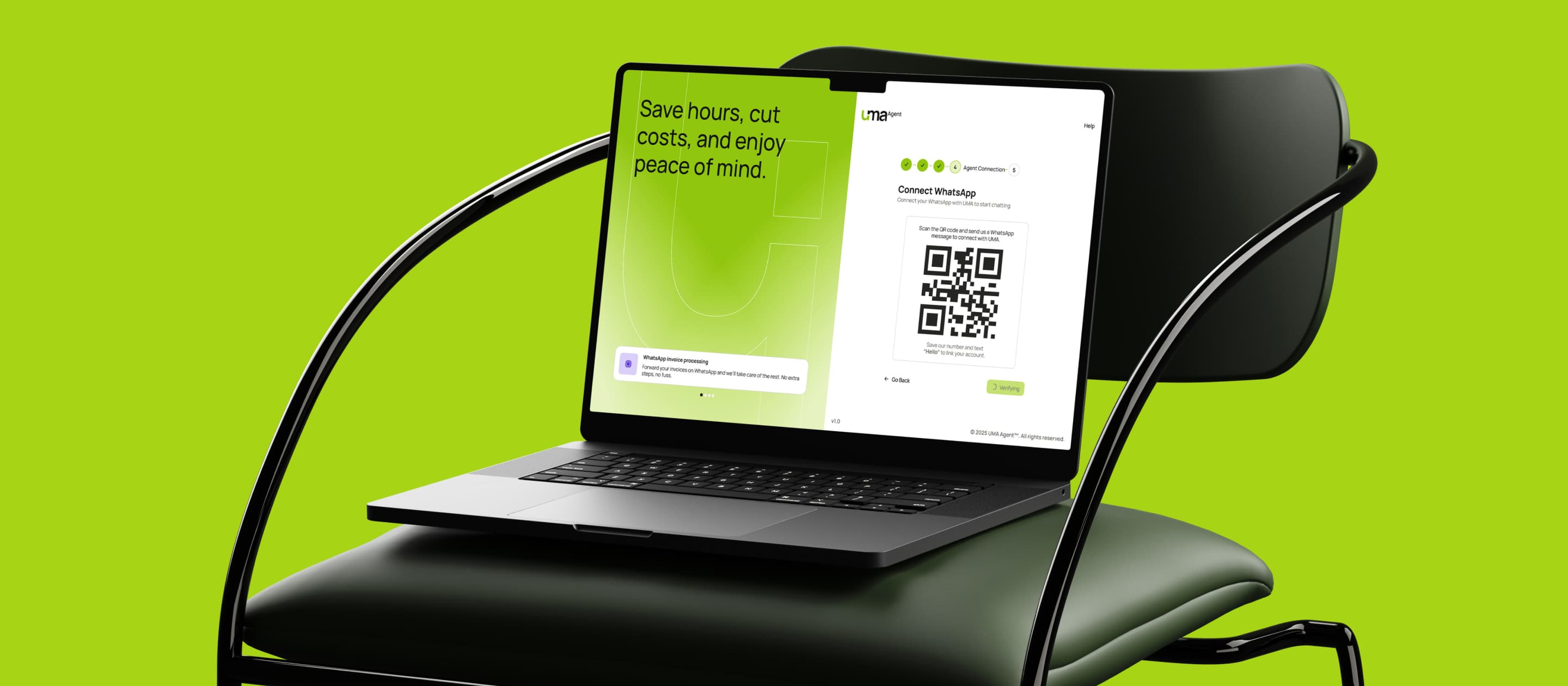
Outcome
- 3 mo
- Discovery to launch-ready End-to-end production build
- 20+
- Design system components Tokens, variants, responsive states
- ~5k
- Lines of production code React + Tailwind, 100% by me
- 2
- Interfaces shipped Web app + WhatsApp
On this page
Select a section
One-line impact
Built a production-ready expense automation platform that turned restaurant paper receipts into structured financial data, eliminating manual tracking friction and creating daily visibility into costs.
Snapshot
Executive summary
UMA was a SaaS platform designed to help restaurant and bar owners automate expense tracking by photographing receipts. Instead of managing paper invoices and manual entry, users could upload receipts via WhatsApp or the web app, and AI agents would extract data, categorize expenses, and provide real-time financial visibility through KPI dashboards and detailed reports.
My role was founding product design engineer. I owned product definition and UX strategy alongside the CTO, designed the complete design system, and wrote production-ready frontend code using React, Tailwind, and AI-assisted workflows. The product shipped with end-to-end functionality across both interfaces, but the company could not secure funding to launch.
Context
In mid-2025, restaurant owners still relied heavily on paper receipts and manual expense tracking. This created friction in daily operations and made it nearly impossible to have real-time visibility into costs, cash flow, or profitability. Accountants and financial advisors struggled to get clean data from their restaurant clients for tax filings and financial planning.
The opportunity was clear: automate the most painful part of expense management — data capture — using technology that fit into existing workflows. Most restaurant owners already used WhatsApp for business communication. By meeting them there, we could eliminate the friction of switching to a new app or visiting a web portal for routine uploads.
The company was attempting to establish a new category in the expense-management space. Unlike general accounting software (which required extensive setup and were designed for accountants, not operators), UMA was built specifically for the restaurant vertical, with a focus on speed and accessibility.

Problem statement
Restaurant owners faced three major operational challenges: friction in expense capture, lack of real-time financial visibility, and difficulty collaborating with accountants and advisors. Tracking expenses manually through receipts, spreadsheets, or disconnected tools was time-consuming and error-prone, while most financial reconciliation only happened monthly or quarterly, limiting the ability to react to costs as they occurred.
Friction in capture
Scan, photograph, manual entry
OCR receipt
extraction & auto-categorize
batch workAutomated in
5–10 seconds
No real-time visibility
Monthly or quarterly reconciliation
Live dashboard
Expense tracking in real time
Sharing with advisors
Manual spreadsheet compilation
Structured export
for accountants & financial advisors
The business strategy focused on validating product-market fit within the restaurant industry by proving that a WhatsApp-first, AI-powered expense platform could successfully acquire and retain restaurant owners. The product needed to differentiate itself from generic expense tools through a combination of AI receipt extraction, mobile-first UX, and WhatsApp accessibility, while creating a long-term defensible moat through workflow integration and B2B partnerships with accountants, financial advisors, and POS providers.
Physical receipts
Paper & photos
OCR extraction
Auto-categorize
Live dashboard
Daily insights
Exportable data
For accountants & POS
Physical receipts
Paper & photos
OCR extraction
Auto-categorize
Live dashboard
Daily insights
Exportable data
For accountants & POS
Three core pillars
Simplicity
- Photo to data in one tap
- Mobile-first for back-office
Financial clarity
- Real-time cost control
- Standardized reporting
Operational reliability
- Accurate OCR
- Integration with POS & advisors
The core challenge was not just automating receipt capture, but transforming a broad business vision into a scalable product experience that balanced simplicity, financial clarity, and operational reliability. The platform needed to make uploads frictionless through WhatsApp, convert unstructured image data into accurate financial records, and surface meaningful insights without overwhelming restaurant owners with complexity.
Converts physical receipts to structured data in one action. Competitors require manual tagging or spreadsheet entry.
Built for back-office reality, not desktop workflows. Photo-to-database in seconds — no PCs required.
Live dashboard replaces monthly reconciliation cycles. Enables cost control decisions at operational speed.
Data exportable to accountants, tax advisors, POS systems. Creates switching cost through operational integration.
Auto-categorizes by supplier, expense type, COGS category. Generic tools require manual mapping.
Receipt capture feeds into cost tracking, supplier management, inventory planning. No data silos.
My role
I joined UMA as a Founding Product Design Engineer with 10% equity, leading product definition, UX strategy, and frontend execution in close collaboration with the CTO. My role covered the full product lifecycle, from defining the core UX architecture and validating financial workflows with restaurant owners, to designing the complete design system and building the entire production frontend in React + Tailwind using Cursor and Figma MCP. I also contributed to product strategy decisions around subscriptions, roadmap direction, implementation constraints, and API-driven data structures to ensure the platform remained scalable and aligned with real operational needs.
Product strategy
The product strategy was shaped around three principles: accessibility over complexity, depth on demand, and solving real restaurant problems. Instead of forcing users to learn new workflows, UMA met them where they already were — WhatsApp — while the web platform provided deeper access to financial insights, trend analysis, and exportable reporting. We intentionally avoided unnecessary management layers and focused the experience around the one question restaurant owners actually care about: "Am I making money?"
Key decisions
| Decision | Why it mattered | Trade-off |
|---|---|---|
| WhatsApp + Web, not mobile app | Restaurants have phones, not custom apps. WhatsApp is already open. Accessibility = distribution. | Web on mobile is less native, but eliminates app store friction. |
| Mobile-first responsive design | Restaurant owners use phones in the kitchen, on the floor. Desktop access is secondary. | More complexity in design system (breakpoints, responsive tables). |
| KPI-focused dashboard, not document management | Owner behavior: check if business is profitable. Not: manage document queues. | Hides important metadata (approval status, document count). Only validated through conversations, not research. |
| User-controlled categorization | Restaurants have unique expense structures. Forcing predefined categories breaks adoption. AI suggests, users refine and train. | More UI complexity (edit, delete, create flows). Requires clear labeling and defaults. |
| Conversational chat interface | Owners ask natural-language questions ("What were my expenses last month?"). AI can answer directly. | Not a must-have. Added delight but not core value. |
| Export to external formats | Accountants and financial advisors need clean data files to file taxes. This was a major unlock for B2B expansion. | Required additional data parsing and formatting logic. |
UX architecture
The product was structured around complementary journeys across WhatsApp and web:
Restaurant owner
One user, four cadences, one Supabase truth
Daily — WhatsApp upload
Photograph receipt
Send to UMA via WhatsApp
AI extracts data
Async — no friction
Summary + link to invoice table
Weekly / monthly — Web review
Open dashboard
Scan KPIs
Revenue, expenses, net profit, profitability
Drill into category breakdown
Review individual invoices
Edit or correct categorization
Ask questions via chat
Month-end — Analysis
Review spending trends over time
Identify cost spikes
Export for accountant or advisor
Ongoing — Model training
AI misclassifies an expense
Owner corrects in invoice table
Model learns for future uploads
Final solution
Flow 1: Receipt Upload via WhatsApp
Problem: Most expense data starts as a physical or digital receipt. Manually entering it into a system is slow and error-prone. Owners need this to be as easy as taking a photo.
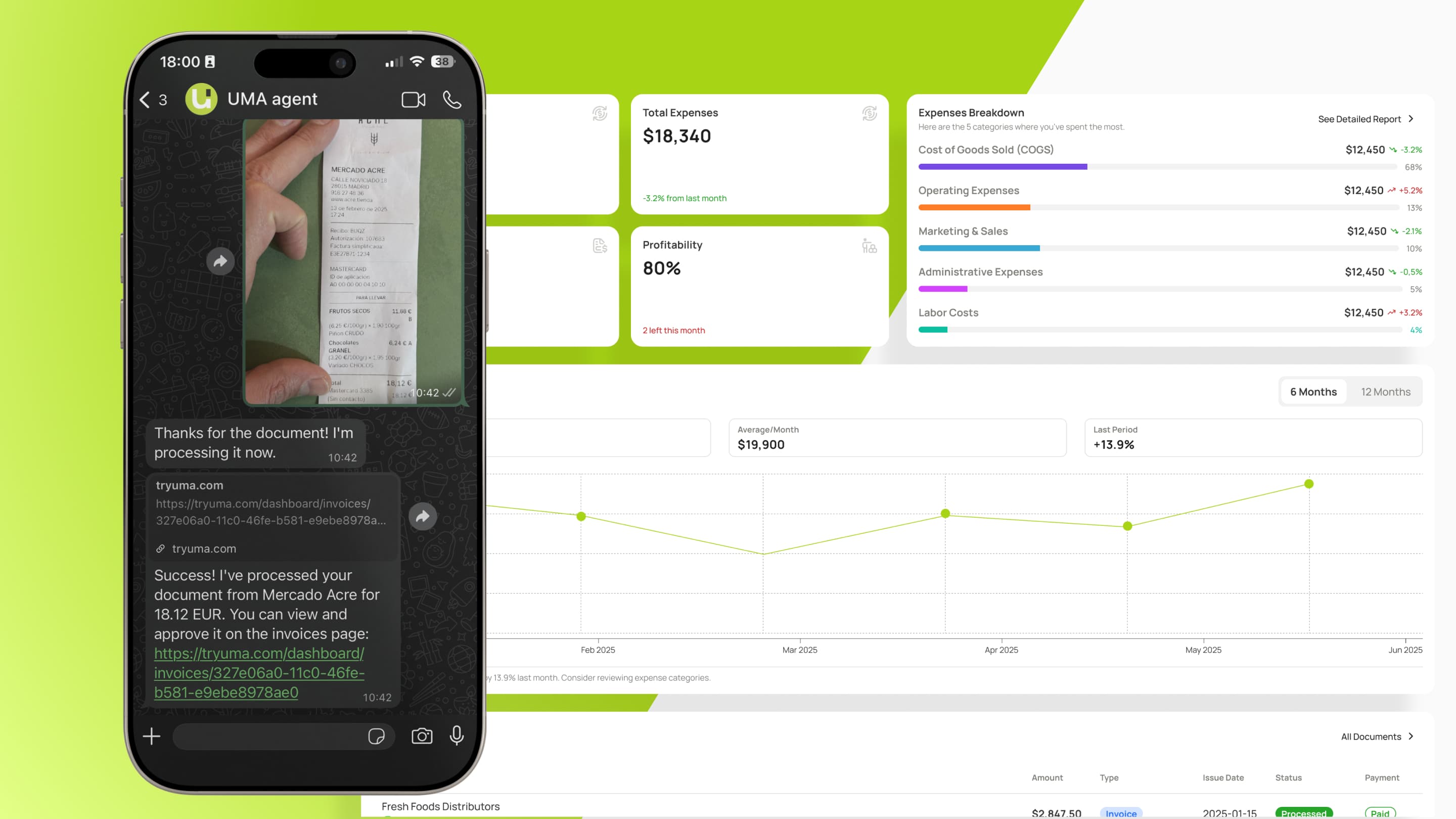
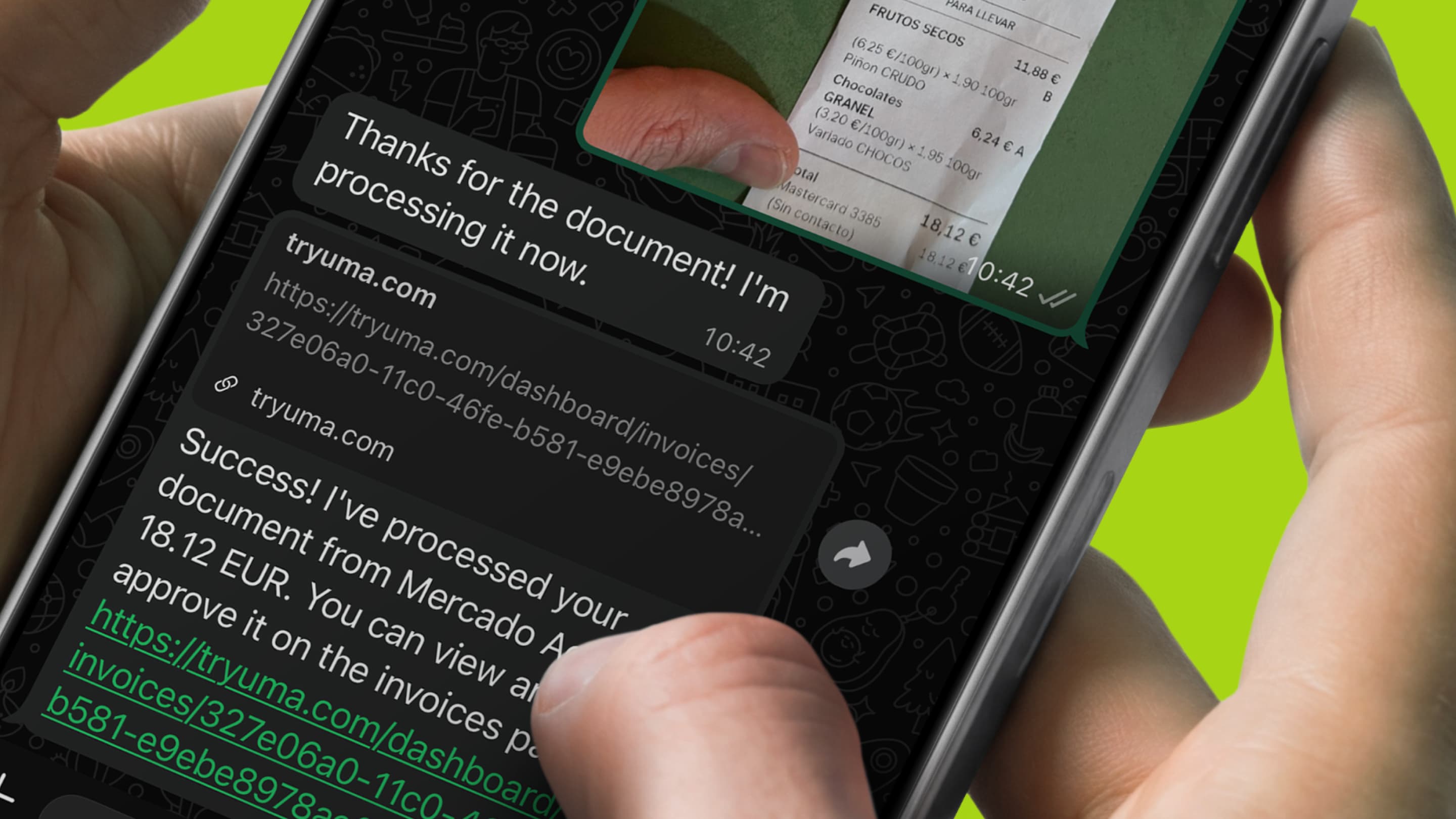
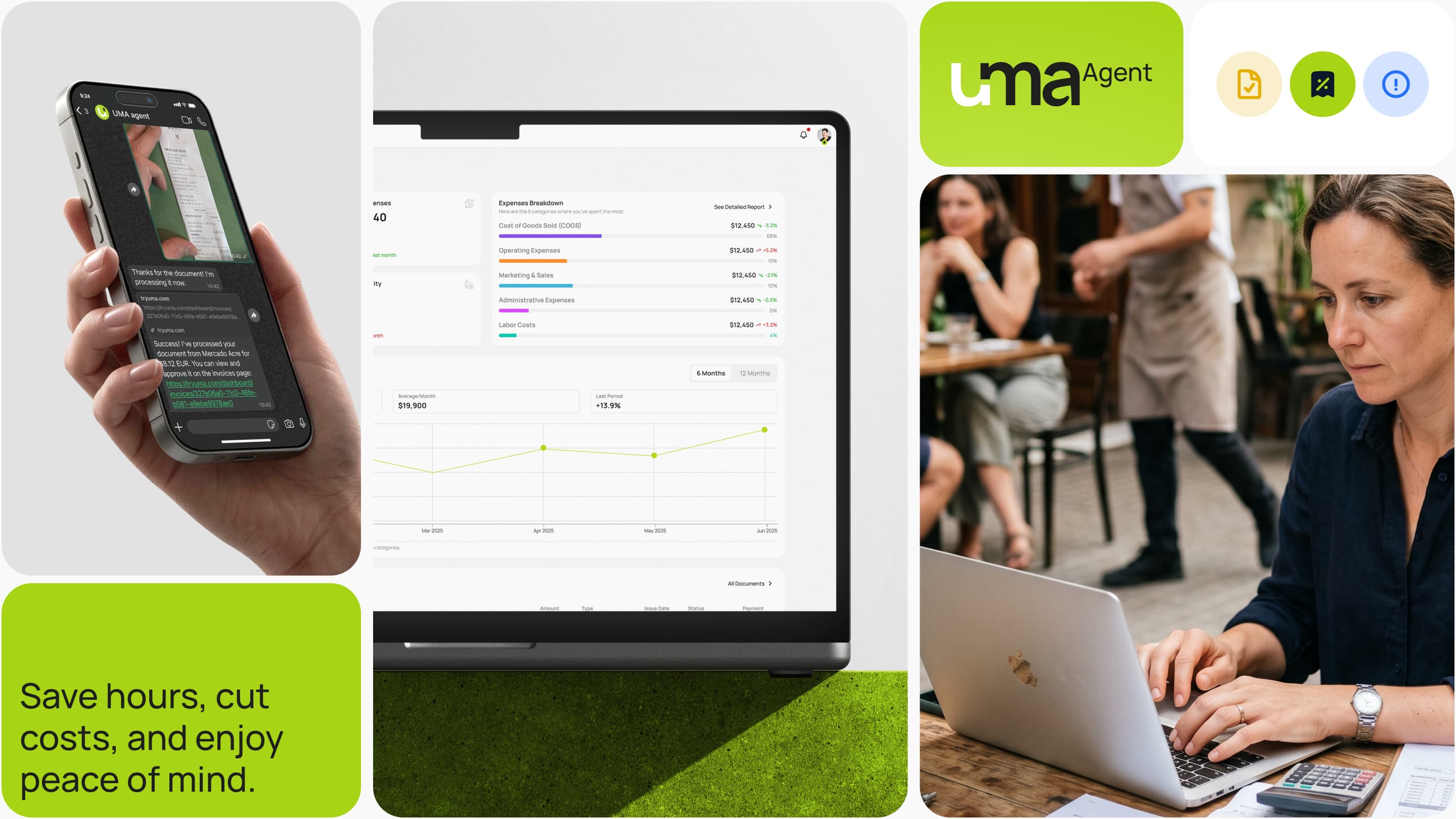
Solution: Owner sends receipt photo to UMA's WhatsApp number. The image goes to an extraction service. An AI agent processes it, categorizes the expense, and sends back a confirmation message with a summary and a link to the full invoice table in the web app.
The system worked because it prioritized speed and simplicity. Receipt uploads happened directly through WhatsApp, removing friction from the process while giving users immediate feedback that their files were received. AI processing happened asynchronously in the background, allowing owners to continue their workflow without waiting, while a single conversation thread handled both expense capture and financial questions.
Flow 2: Dashboard + KPI Overview
Problem: Owners need a quick answer: Is my business making money? They need this daily. But they also need to understand where money is being spent.
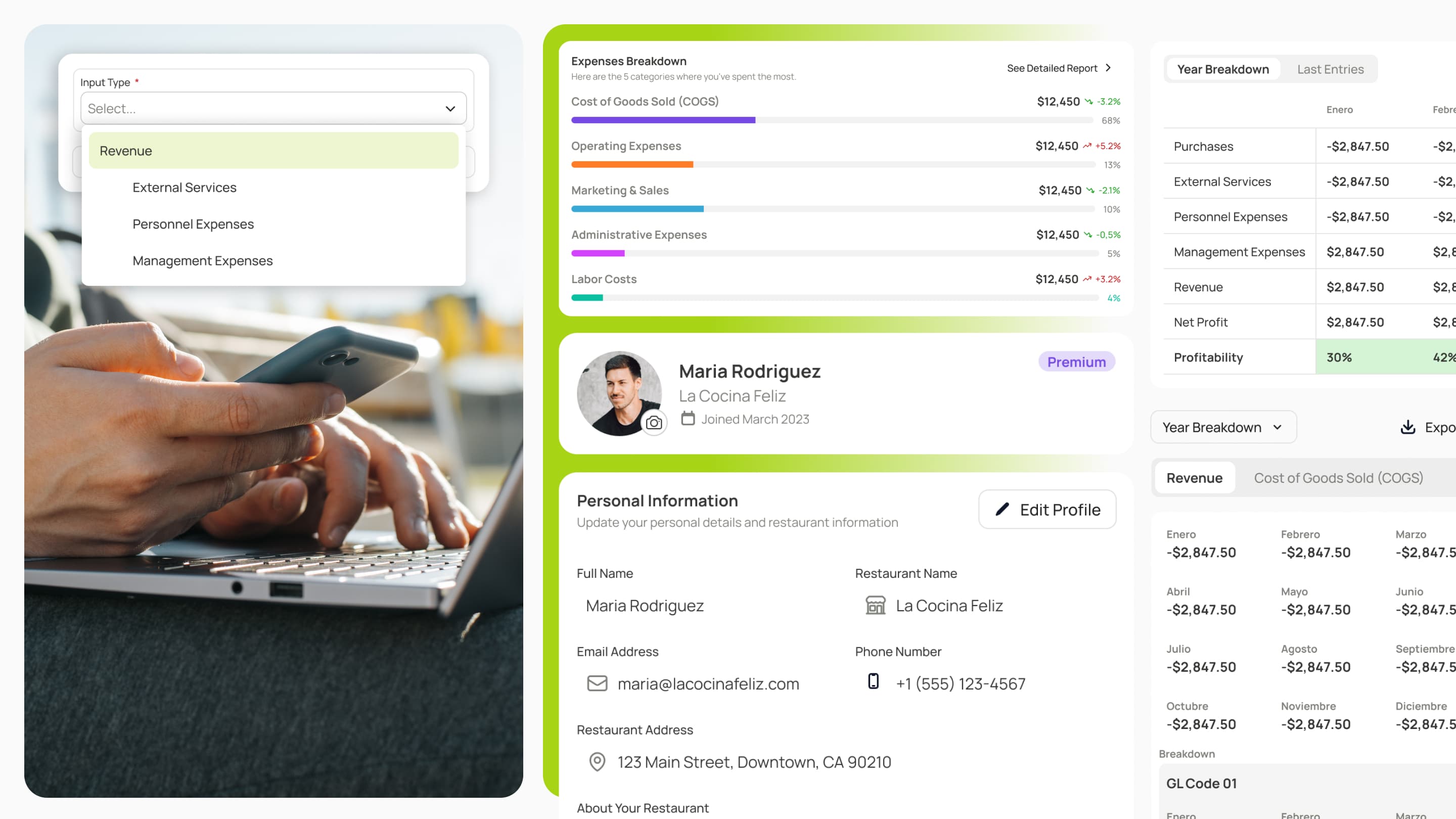
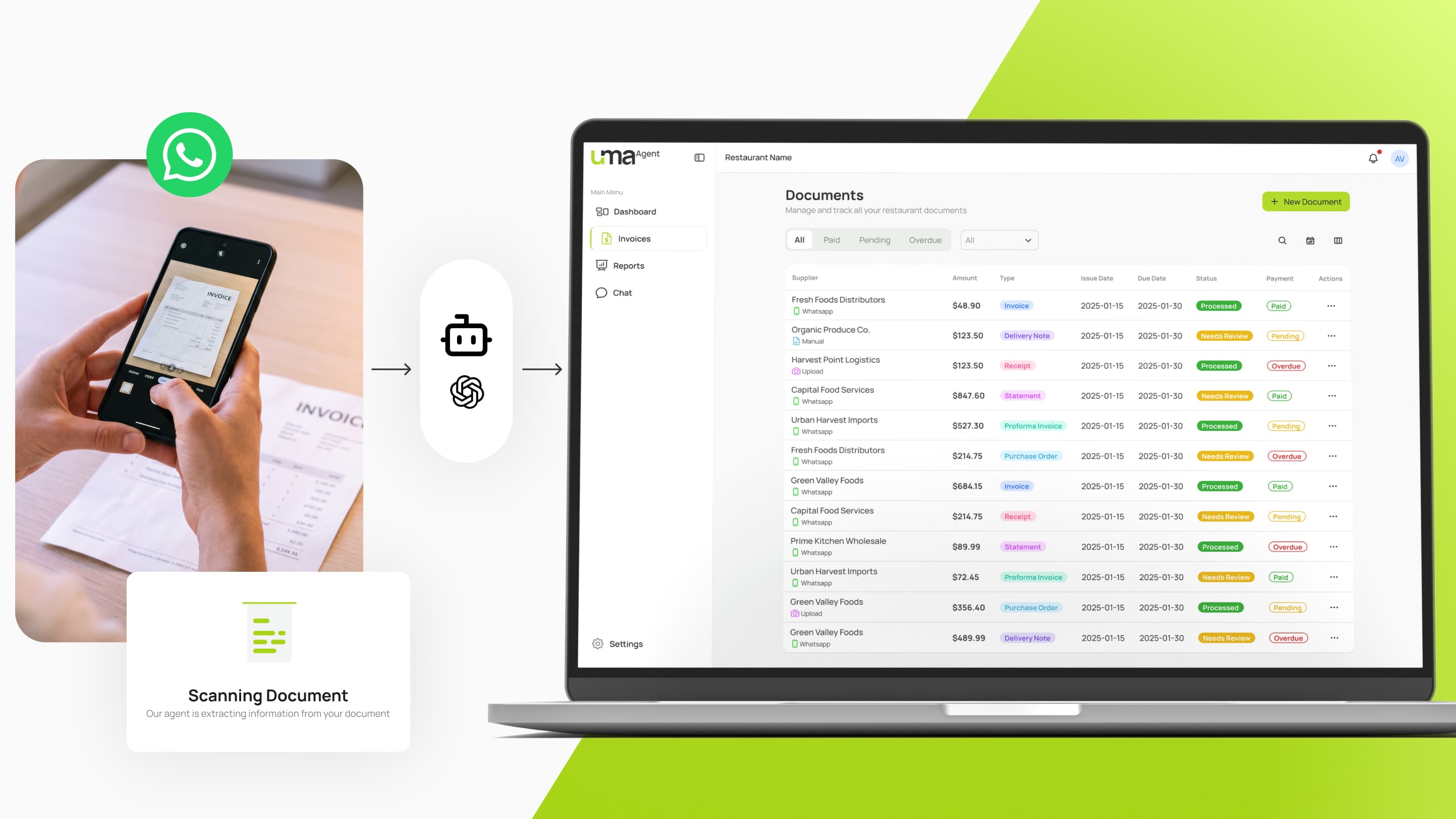
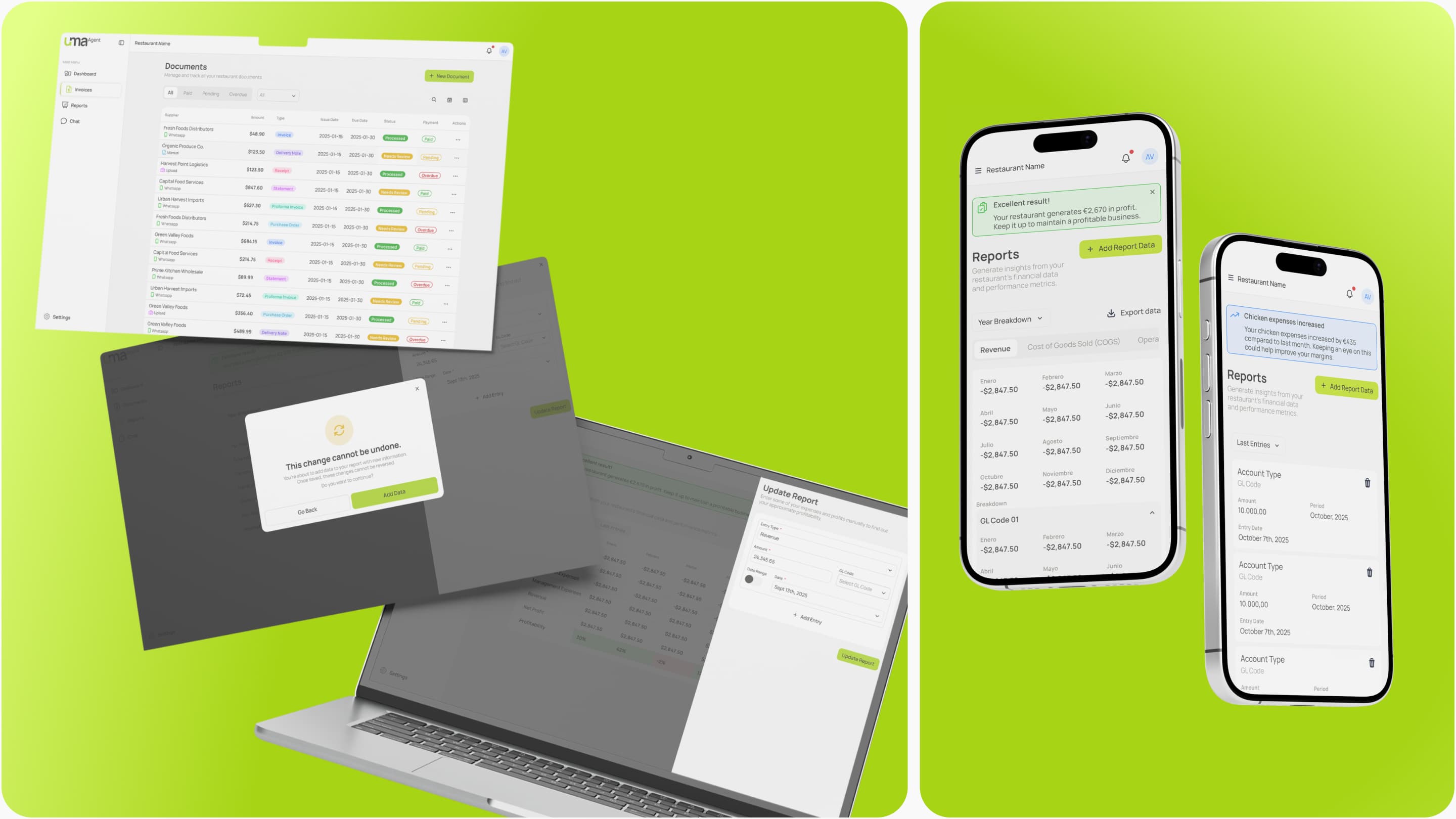
Solution: The dashboard shows four KPI cards (Total Revenue, Total Expenses, Net Profit, Profitability) at the top. Below, an Expenses Breakdown visualizes the top five cost categories with color-coded bars. A Spending Trends chart shows expense trajectory over the last six months.
The dashboard worked because it focused on clarity over complexity. Core metrics like revenue, expenses, and profit answered the most important business question in seconds, while semantic color coding reduced cognitive load and made financial health instantly understandable. More detailed insights were progressively revealed through a clear drill-down structure, and the entire experience was designed with a mobile-first layout that remained easy to scan and navigate on smaller screens.
Flow 3: Invoice Table + Categorization Control
Problem: Owners need to see all uploaded receipts in one place, verify extraction accuracy, correct mistakes, and track payment status. They also need to train the AI by overriding incorrect categories.
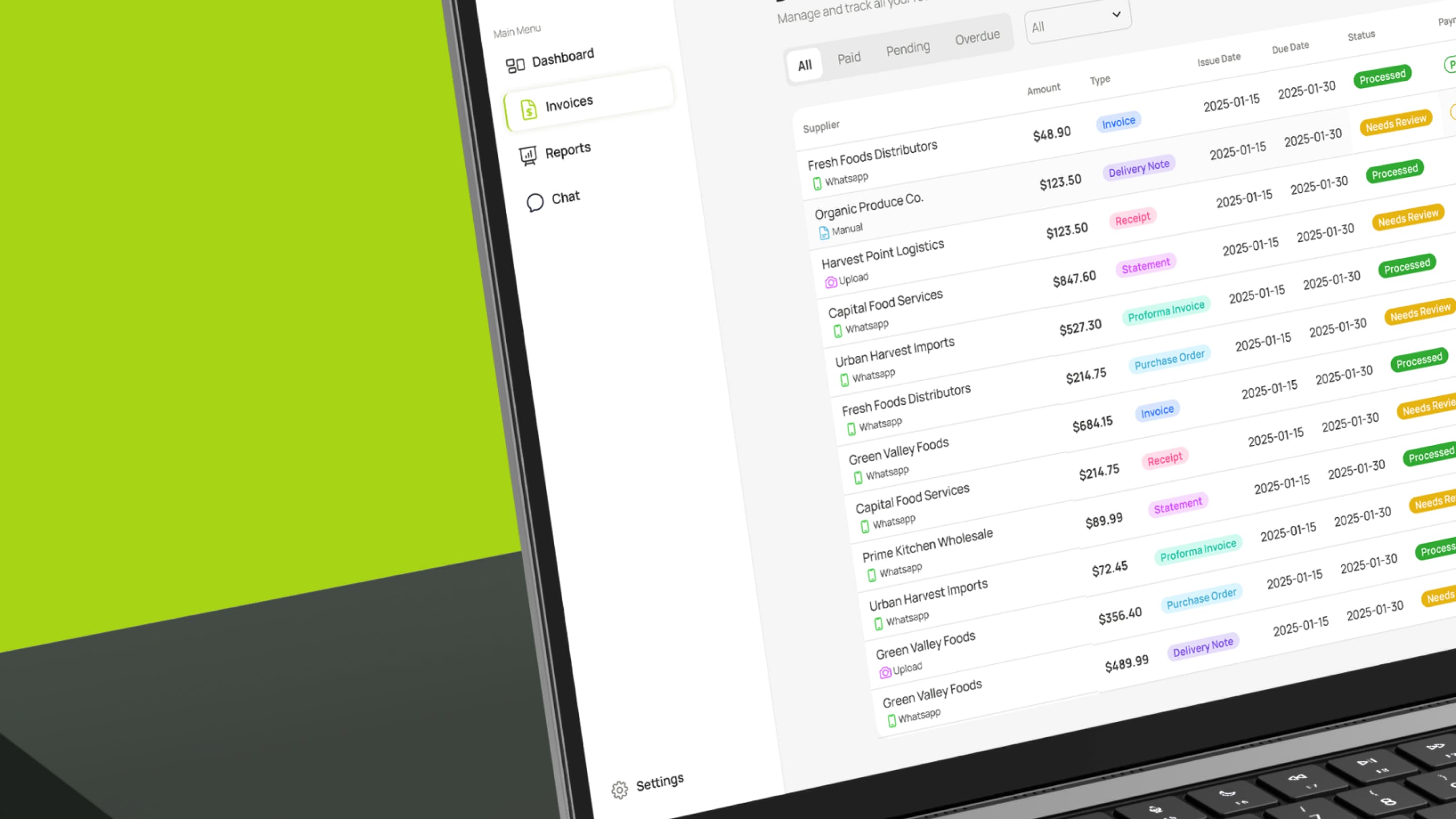
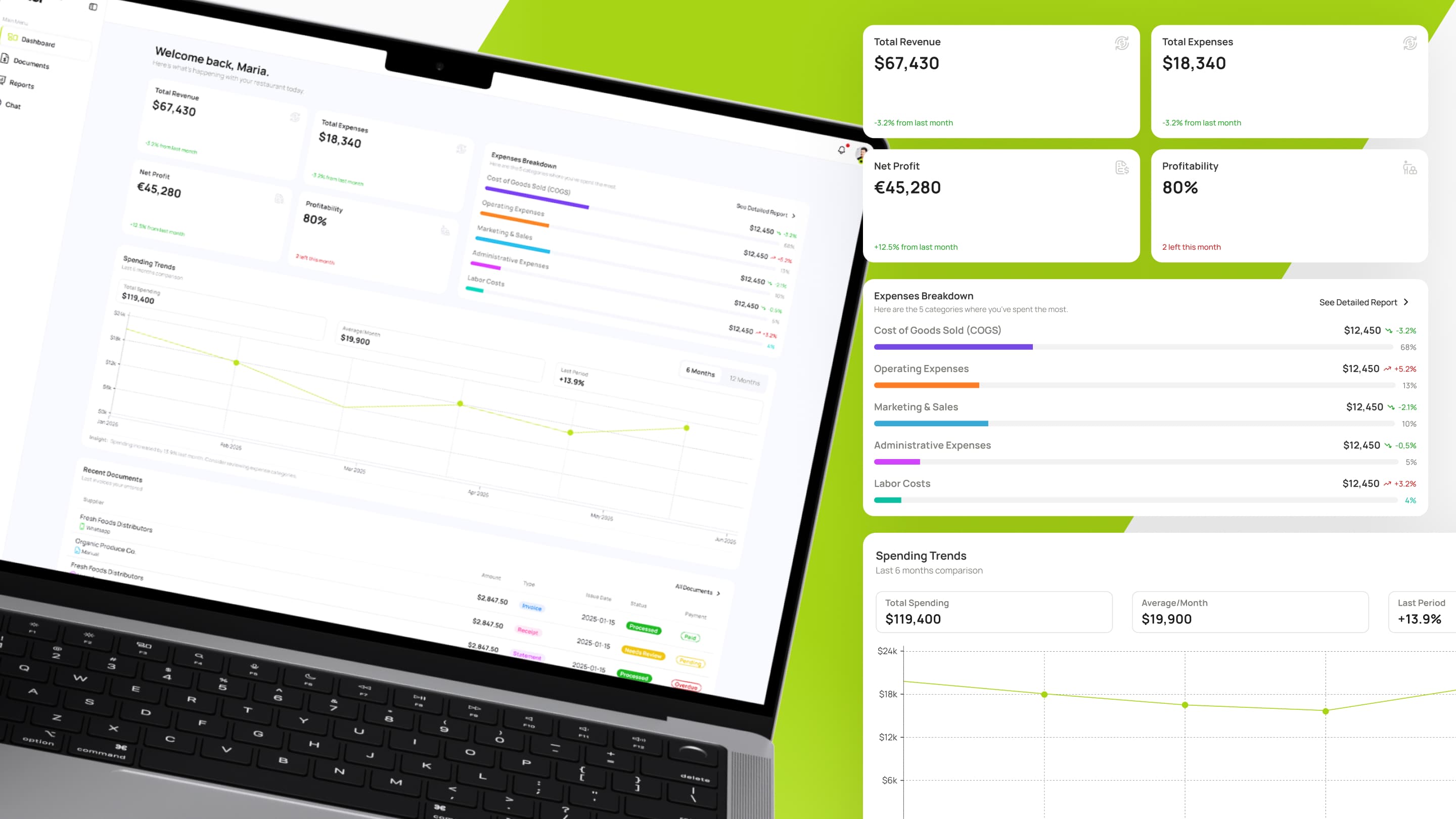
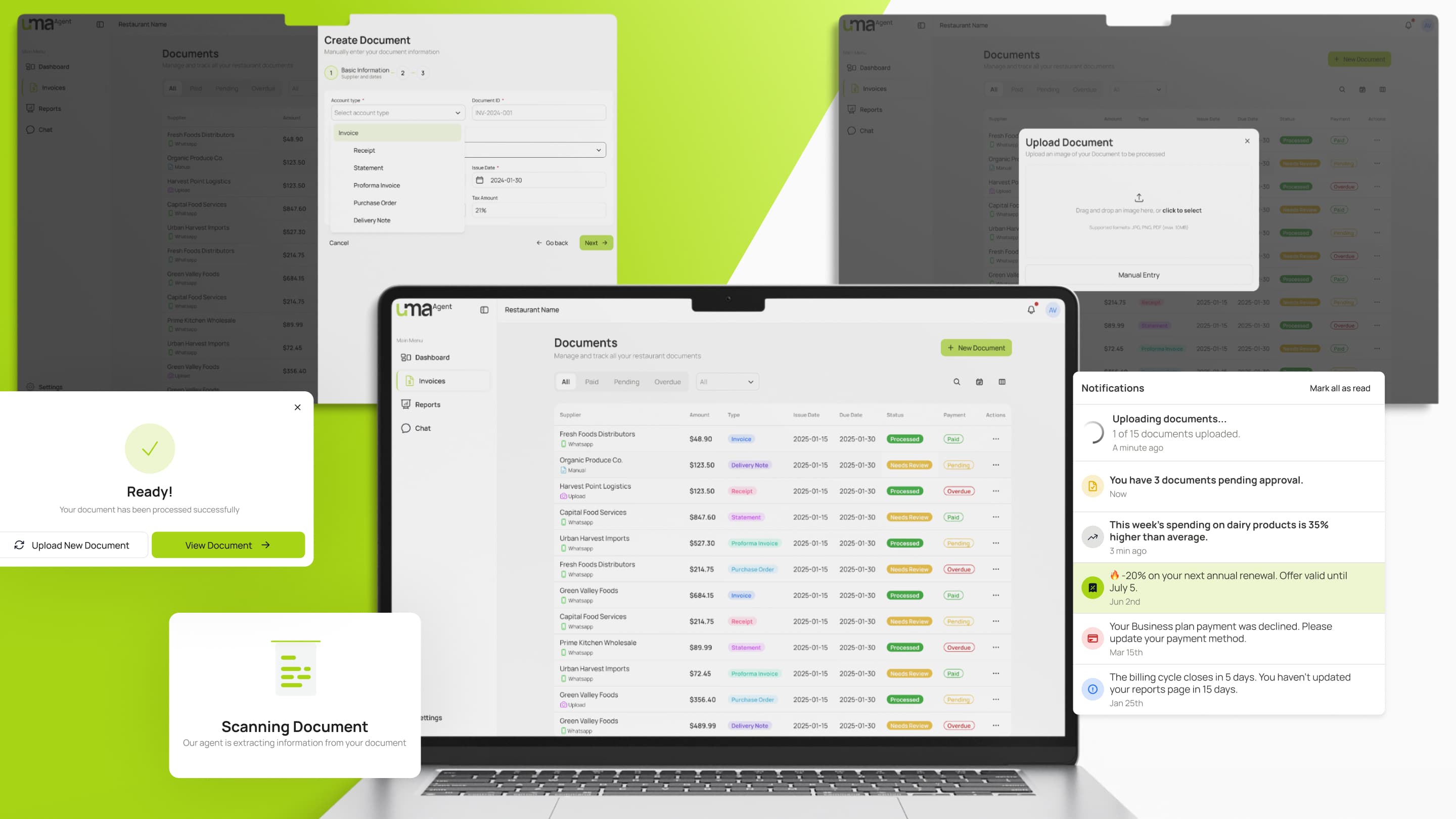
Solution: A searchable, filterable table shows all invoices with columns: Supplier, Amount, Type (Invoice, Receipt, Delivery Note, Statement, etc.), Issue Date, Due Date, Status (Processed, Needs Review), Payment (Paid, Pending), and Actions. Users can click any row to view details, edit category, or mark as paid.
The expense management system worked because it combined visibility, control, and operational clarity. Every expense remained fully traceable through a complete audit trail, while users could quickly correct AI mistakes and improve data accuracy over time. Features like payment status tracking, bulk management actions, and export-ready data structures made it easier for restaurant owners to manage cash flow and collaborate with financial advisors without additional manual work.
Flow 4: Reports + Year Breakdown
Problem: Owners need to understand expense patterns over time. Which months were profitable? Where did spending spike? They need this data in a format they can study and share with advisors.
Solution: The Reports section shows a Year Breakdown table with rows for each expense category (Purchases, External Services, Personnel Expenses, Management Expenses, Revenue, Net Profit, Profitability) and columns for each month. Users can see exact amounts and trends at a glance. A toggle lets them switch between 6-month and 12-month views. An "Export data" button lets them download the entire dataset for accountants.
The reporting system worked because it provided complete financial visibility in a single structured view, making revenue, expenses, and category breakdowns easy to understand over time. Viewing data across longer periods helped owners identify seasonal patterns, cost anomalies, and operational trends that would otherwise remain hidden in spreadsheets or disconnected reports. The information was also designed to be export-ready and presented in a professional financial format familiar to accountants and advisors, reinforcing trust and making the platform feel operationally reliable rather than consumer-oriented.
Design Engineering & Frontend Implementation
UMA became a defining moment in my transition from Product Designer to Product Design Engineer. I owned the full frontend implementation layer, combining product thinking, design systems, and AI-assisted engineering workflows to ship production-ready interfaces.
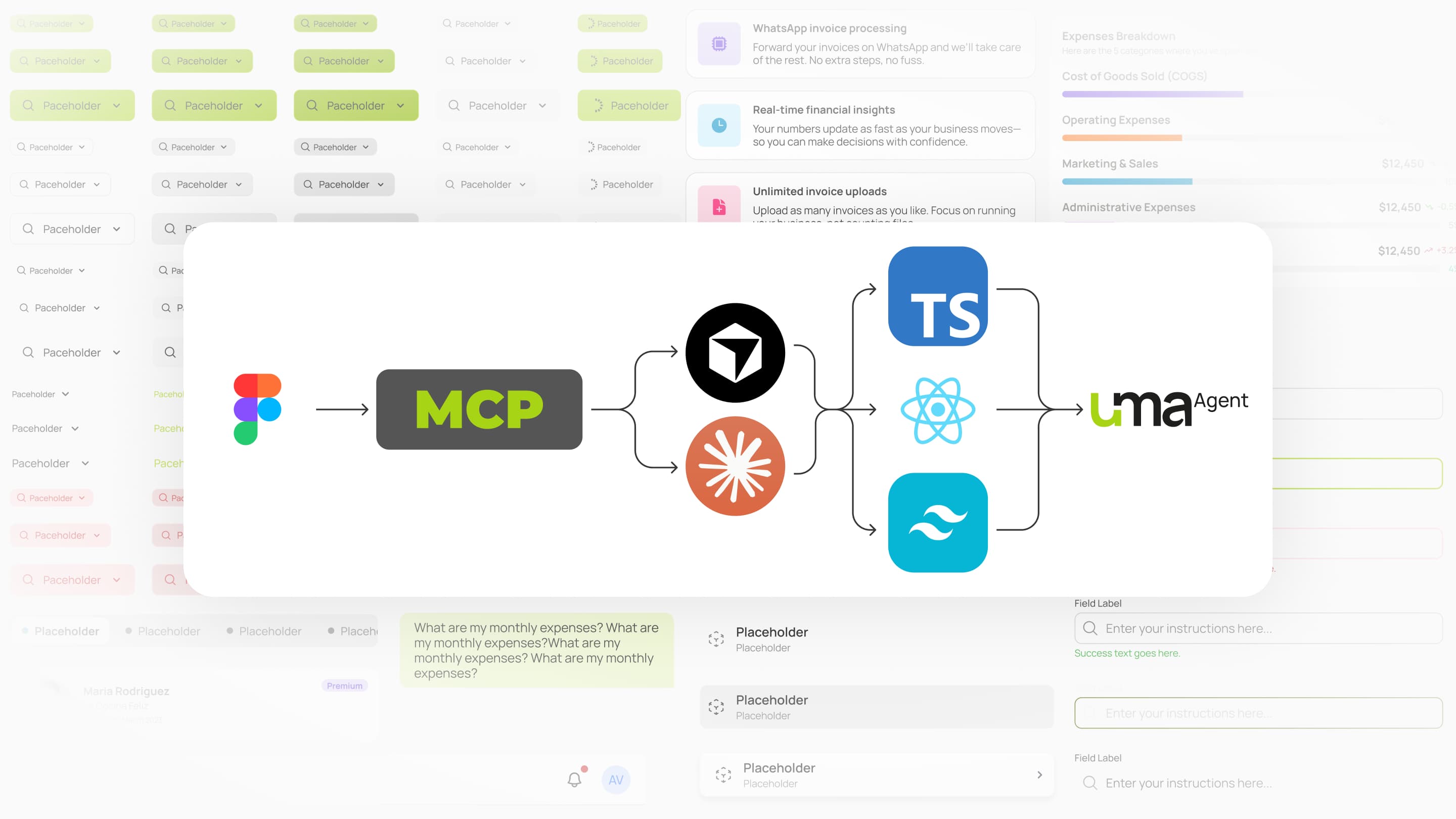
The design system was built ground-up to support scalable implementation across mobile, tablet, and desktop environments. Components were intentionally structured to map directly into React architecture, with reusable behaviors, aligned prop structures, and synchronized design tokens exported from Figma into the Tailwind configuration.
Using Figma, Cursor, Claude, and Figma MCP integration, the workflow evolved into a tightly connected design-to-code pipeline. Components were designed, generated into React code, refined through prompting and implementation, connected to real APIs, and validated across real devices in an iterative loop that significantly reduced the gap between design and production.
Beyond UI execution, the role required close collaboration with the CTO to align frontend behavior with backend and product logic. This included dashboard data flows, invoice processing states, AI categorization behavior, export formatting requirements, and real-time synchronization between WhatsApp uploads and the web application.
Responsive behavior and usability were treated as core system requirements rather than post-launch adjustments. Complex data interfaces adapted dynamically across breakpoints, including table-to-card transformations on mobile, simplified KPI visualizations, and fully defined interaction states across all components.
Due to timeline constraints, quality assurance relied primarily on manual testing across iOS Safari, Android Chrome, and desktop browsers. However, the consistency of the component system and shared architecture helped minimize regression risk throughout development.
Collaboration
Collaboration & product alignment:
UMA was built by a small, highly collaborative team, which created fast iteration cycles and close alignment between product, design, and engineering. Working directly with the CTO, we aligned on AI workflows, API structures, edge cases, and implementation constraints to ensure the UX matched technical reality. Together, we reviewed staging builds, refined system behaviors, and clarified how the platform should handle ambiguous receipts, duplicate uploads, and categorization conflicts.
Business & user validation:
Collaboration with the CEO, who was also a restaurant owner, provided direct access to the target market and shaped many of the product decisions. Through conversations with him and his peer network, we validated which financial metrics mattered most, how restaurant owners managed expenses operationally, and when they actually interacted with financial tools during their daily workflows. This lightweight validation — not formal user research — confirmed that manual expense tracking was genuinely painful and helped shape key dashboard KPIs, product positioning, and feature prioritization under real business constraints.
Results and impact
In just three months, UMA reached a fully production-ready state with a polished web application, WhatsApp integration, and AI-powered expense extraction workflows working end-to-end. The platform included a complete design system with reusable components, responsive variants, semantic tokens, and structured documentation, while the frontend architecture consisted of roughly 5,000 lines of production React code built with Tailwind and integrated with real backend data flows. Product strategy, UX, and engineering remained tightly aligned throughout development, and the workflows and KPIs were validated directly with restaurant owners to ensure the platform solved real operational problems.
Why it never launched:
Despite the product being technically complete, the company was unable to secure the angel investment required to continue operations and fund launch activities. A key business opportunity also failed to close, leaving the small three-person team without enough runway to sustain development and go-to-market execution. The project ultimately stopped not because of failures in product quality, UX, or engineering execution, but because the business side of the company could not secure the financial support necessary to continue.
What the project proved:
UMA demonstrated that a small team could rapidly build a differentiated, multi-interface SaaS platform by combining AI-assisted development workflows with a strong product and design foundation. The project validated both the market opportunity and the effectiveness of the technical approach, especially around the combination of WhatsApp-based workflows and AI-powered expense tracking, which competitors began adopting shortly after development stopped. It also proved that AI-assisted tooling like Cursor and Claude could be used to produce scalable, production-grade frontend systems without sacrificing design precision or code quality.
What I would improve
One of the main areas for improvement was processing performance. While the AI extraction flow was functional, the 5–10 second delay during receipt processing was still noticeable and affected perceived product quality. Additional optimization around extraction speed and dashboard loading performance, especially on slower mobile connections, would have improved the overall responsiveness and trust in the platform.
Analytics & onboarding:
The product launched without a proper analytics and instrumentation layer, which limited visibility into real user behavior and made roadmap decisions rely heavily on assumptions instead of usage data. At the same time, the onboarding experience needed more structure for first-time users unfamiliar with expense categorization or financial tracking workflows. Guided uploads, smarter category suggestions, and clearer early value moments would likely have improved adoption and long-term retention.
Future product validation:
Several strategic initiatives remained unvalidated due to the product never reaching market launch. Planned features like POS integrations, inventory tracking, and a token-based subscription model were part of the post-MVP roadmap, but the team never had the opportunity to measure real customer demand, pricing sensitivity, or feature adoption. Testing these assumptions with active users would have helped clarify the long-term product direction and business model.
Final reflection
UMA proved that I can operate as a Product Design Engineer — someone who owns product strategy, UX architecture, and production implementation in one person.
The project forced me to think across multiple layers: What does the restaurant owner actually need? How does WhatsApp change the UX compared to a web-only app? How do we structure the data so it's both useful for analysis and clean enough to export to accountants? What components do we need to build once and reuse across screens? How do we write React code from Figma designs using AI without losing quality?
Most importantly, this was the project where I learned that design and code don't live in separate worlds. By using Cursor + Figma MCP, I could design in Figma, generate code from that design, iterate on both simultaneously, and ship production-ready UI that matched the design exactly. No handoff gap. No "it looked better in Figma." No missed states or responsive breakpoint regressions.
This shift — from Designer who hands off to Code, to Design Engineer who owns the continuum from product thinking through shipped pixels — changed how I see my role. UMA was the proof of concept that this way of working actually works at production scale.
The product didn't launch for business reasons, not product reasons. But the work created the foundation — product clarity, design system, production code, team alignment — that would have made rapid iteration possible if the business had gotten the chance.

Next case study
helloDojo — Customer App